AI video production — 2026-06-28PUBLIC
AI video production and tools: the cinematic and factory camps, the transcript you actually own, and the local-versus-cloud rule
AI video's real bottleneck was never the prompt, it's the system. Two camps, cinematic craft and factory volume, share one toolchain. The transcript and captions are what you own, and one rule, how closely the viewer inspects, decides synthetic presence and local-versus-cloud.
≈ 32 min read
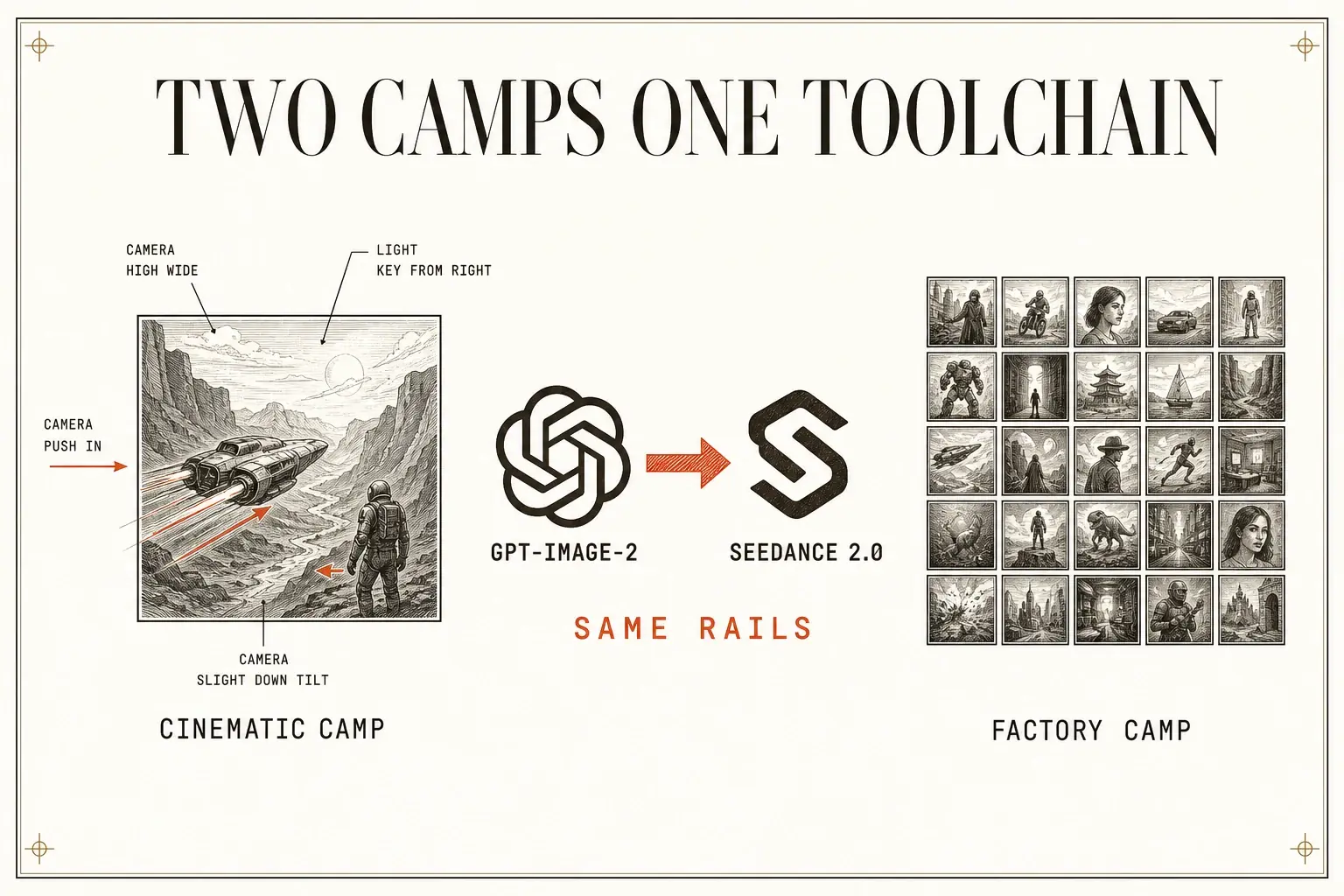
The hardest problem in AI video was never the first shot. It was the second one looking like it belonged in the same movie. A character walks through a door, sits down in the next scene, same face, same shirt, same light, and the model forgets all three. Faces mutate. Lighting drifts. The camera loses its place. You end up holding a stack of gorgeous, unrelated postcards instead of a film.
flowchart TD
    P["One drift problem:<br/>shot two forgets shot one"] --> C["Cinematic camp:<br/>fight for the perfect shot"]
    P --> F["Factory camp:<br/>ship 500 imperfect ones"]
    C --> S["Same realization:<br/>build a system, not better prompts"]
    F --> S
Somewhere else, a different group stopped caring about the perfect shot entirely. They were too busy making five hundred imperfect ones before dinner. One camp fought to make AI video look like cinema, the other turned it into a factory, 25 hook variations tested by lunch, the winner on every platform by evening, at pennies a clip where a human UGC creator used to cost $150–$500 and three weeks of waiting (creator-reported figures).
The prompt was never the bottleneck. The people shipping in 2026 aren't lucking into results, they built systems.
Two camps, opposite goals, one shared realization. And under all of it runs a single rule that decides nearly every choice downstream: how closely will the viewer inspect this?
That one question decides two things:
- where a synthetic face or voice is safe, and
- with a hard VRAM floor, whether a job should run on your own GPU or a rented one.
This is the field guide to the craft and the tools. (The autonomous pipeline that strings these tools into an unattended machine, the orchestration, the build-versus-buy math, and the ways it fails silently, is its own note: the autonomous video pipeline. This note is the craft layer underneath it.)
CH.01
Why was the prompt never the bottleneck?
The gap between impressive AI video and usable AI video isn't generation quality. It's control. Better prompts don't fix character drift, melting transitions, or a face that changes between cuts. A workflow does. The creators who win treat the model like a cinematographer they're directing, not a slot machine they're feeding.
Two camps grew out of that one insight, and they look like opposites:
| Cinematic camp | Factory camp | |
|---|---|---|
| Optimizes for | consistency, control, craft | volume, speed, test velocity |
| The unit | one shot that belongs in a film | 500 ads that surface a winner |
| Wins when | the work has to hold up on a big screen | unit economics are tested same-day |
| Monetizes via | high-end production, client films, high-ticket trust | direct-response e-commerce, affiliate commissions |
| Lead voices | @AIWarper, @alex_bagnuoli89, @PJaccetturo, @EyeingAI | @georgesttock, @mikefutia, @rgk_degen, @shalevhvs |
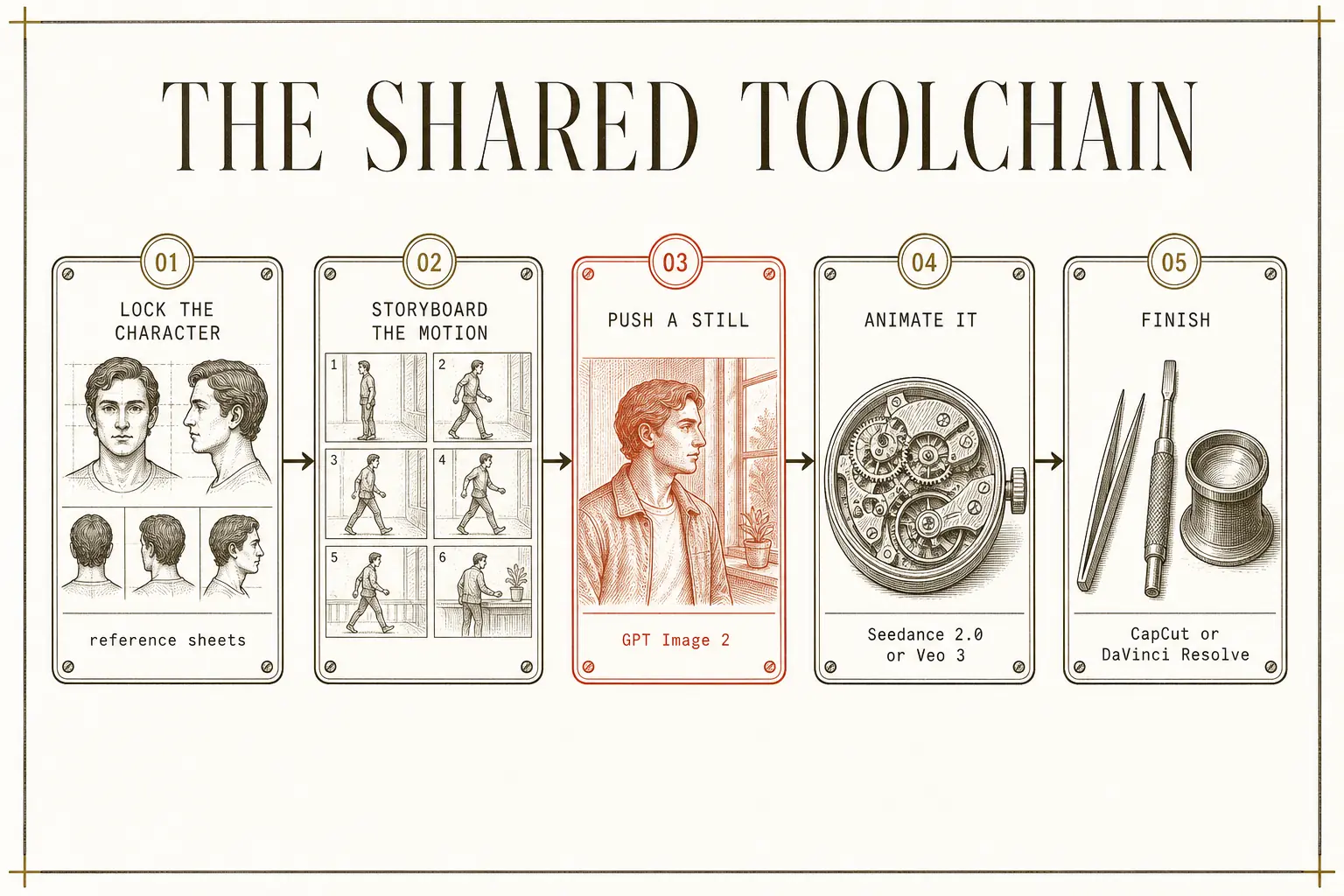
Here's the part nobody says out loud: both camps run on the same rails. Lock a character with reference sheets. Storyboard before you generate motion. Push a still through GPT Image 2 → Seedance 2.0 or Veo 3. Finish in CapCut or DaVinci Resolve. The cinematic camp uses those rails to protect a story, the factory camp uses them to mass-produce ads. Same toolchain, divergent goal. The rest of this note is what's actually on those rails, the craft moves, the one asset worth owning, and the rule that places synthetic presence and decides where you generate.
CH.02
What separates cinematic control from "AI slop"?
Four control mechanisms separate cinematic AI video from slop, and they stack. Annotation gives frame-level precision, storyboarding gives narrative coherence, hybrid production gives speed, and integrated editors give accessibility. Professionals don't pick one, they storyboard for structure, annotate the critical shots, and run a hybrid pipeline for delivery.
| Approach | Creator | What it does | Honest limit |
|---|---|---|---|
| Annotation-based directing | @AIWarper | draw the effect onto the reference image, exactly where you want it | the tool "wants to work" but often needs several passes to get the annotation right |
| Storyboard-to-video | @alex_bagnuoli89 | design the story before any motion (GPT Image 2 → Seedance 2.0) | heavy pre-production, the "zero effort" claim covers generation, not the board |
| Hybrid LED-wall production | @PJaccetturo | real-time capture + cloud sync, concept to final the same day | needs AWS-grade infrastructure and real capital |
| CapCut Director Mode | @EyeingAI | idea → script → characters → connected shots → edit, with project memory | "solid quality" means acceptable, not exceptional |
Annotation: replace text with a visual constraint
Annotation is the most precise, and the mechanism is the lesson. Instead of a text prompt the model interprets loosely, you mark the reference image itself: "you can even get the exact effect to occur right where you want it." The model treats the annotated image as a visual input, not a sentence, it sees the fire circle in the pixels where you drew it, reads your arrow as a motion vector anchored to a spot. You've moved from "put fire on the left of the building" to "put fire here." The principle generalizes: whenever you can replace a text description with a visual constraint, do it. Text is lossy. A drawn circle is not.
Hybrid production deletes post, it doesn't speed it up
@PJaccetturo's hybrid pipeline is the most ambitious, it deletes post-production instead of speeding it up. The actors are lit by the environment itself, so the light on their faces is physically correct. It collapses what is normally a many-months post process into same-day delivery. The cost is obvious: AWS-grade infrastructure and capital most solo builders don't have.
flowchart LR
    A["LED-wall<br/>environments"] --> B["Real-time<br/>performance capture"]
    B --> C["Sync to AWS<br/>within 30s"]
    C --> D["Pull 4K HDR<br/>during filming"]
    D --> E["Ship final pixels as dailies:<br/>concept to final, same day"]
3D assets are generated and iterated mid-shoot, editors pull 4K HDR during filming for immediate VFX feedback, and final pixels ship as dailies, "from concept to final shot in the same day."
The iteration loop, where it pays off
Then the iteration loop, where these methods actually pay off. @EyeingAI names the economics: "Seedance 2.0 Mini inside CapCut… gives you faster generations, lower cost and solid quality, so you can keep experimenting without every retry feeling expensive." Sketch in the cheap model, ink in the full one. @AIWarper closes the loop differently, he hands his video prompt to an LLM for mechanical changes ("here I asked for zoom in/out transitions"), with an honest caveat: "LLMs sometimes over-correct or follow instructions too literally, potentially losing creativity." Use it for mechanical moves, write the creative prompts yourself.
The shorter your feedback loop, the less drift accumulates across the sequence.
And the rule both camps repeat, design the story before you generate the motion. Without a storyboard you're asking the model to invent the narrative and the pixels at once, with one, the narrative is solved and the model spends its whole capacity rendering. It's the single highest-impact step in either camp.
CH.03
How do you lock a character across shots?
Consistency is reference specificity multiplied by generation control, not model quality alone. The single move that fixes most character drift: separate identity from layout. Cram "a blonde woman in a blue dress sitting left of a tall man in black" into one prompt and the model compromises on both the people and the geometry. Give it a character sheet for each person plus an annotated image of where they sit, and each input does one job.
That's exactly @AIWarper's multi-reference method: "Here I provided my 4 character reference sheets + the annotated image… for seating arrangements. Worked like a charm." Four sheets tell the model who. The annotation tells it where. The approaches split into two honest tiers:
- Single-reference replacement, the fast path. Seedance can swap an existing character using one reference image. "While not exactly 1:1, Seedance does a very convincing job." It misses some details, but for dropping a specific face into a scene, it's one step.
- Multi-sheet world-building, where the real power is. @alex_bagnuoli89 generates a character sheet in GPT Image 2, then feeds it plus a video reference into Pollo AI on the HappyHorse 1.0 model. For food (a notoriously hard consistency domain) he runs DZINE with "model reference, 8-shot storyboard, direction prompts, visual continuity settings, food styling parameters, and finally video generation."
The factory camp reached the same crux from the other side, and added a counterintuitive twist. Don't chase photorealism. Chase recognizability. The faces that bypass the uncanny valley aren't the perfect ones, they're the slightly messy ones: "low-definition front-facing shots, indoor mixed light, slightly oily skin, messy hair." That sheen of perfection is the tell. The anchor detail matters too: a "tiny mole above her lip" gives the model a fixed point to hold across hundreds of generations. Nano Banana's edge here is editing, not just generation, built on Gemini Flash architecture, it changes one element of an existing image without regenerating the whole thing, which is how consistency survives across a batch.
Your character should look filmed on a phone, not rendered in Unreal Engine.
For the camera itself, @alex_bagnuoli89's director-style prompts read like a shot list, not a wish: shot-by-shot actions ("not a cool commercial"), lighting per shot ("rembrandt lighting, key light 45° left," not "cinematic lighting"), motion per shot ("slow dolly in, 0.5m over 3 seconds, ease-out"), style and constraints ("anamorphic lens, grain matched to 35mm Kodak 500T"), and a sync point tying the visual rhythm to the voice-over. For complex work he builds multi-board reference systems, three boards in GPT Image 2, each fed to Seedance 2.0 with explicit image references ("Use IMG_1 to develop the main character… Use IMG_2 to construct a narrative sequence… Use IMG_3 to visualise catastrophic events"). That's not prompting. That's production design.
Build the reference library, annotate the relationships, structure the parameters as data, then render.
The avatar-factory version of the same idea is a tight, repeatable loop. Save a "girl selfie" off Pinterest, use Nano Banana Pro to swap the face on a single prompt, move to a node editor with exactly three nodes, reference image, text, video generator, wire text to text-in and image to image-in, select Kling 2.6, set duration, enable sound, generate. Feed two Pinterest face references at opposite ends of your target aesthetic to ChatGPT, synthesize one character prompt, and you have an anchor you can reuse forever.
flowchart LR
    A["Pinterest selfie"] --> B["Nano Banana Pro<br/>face swap"]
    B --> C["Node editor:<br/>image + text + video generator"]
    C --> D["Kling 2.6:<br/>set duration, enable sound"]
    D --> E["Generate"]
One more production move belongs here, because it's the same recognizability principle pointed at the finished clip: kill the "AI smell." Counterintuitively, the goal is to make the clip look slightly worse, a casual phone snapshot, not a retouched render. The pass, in order:
- Voice first. Run everything through ElevenLabs or your own voice model, the voice carries authenticity more than the visuals.
- De-plastic in CapCut. Film grain, slight desaturation, natural lens distortion, ambient sound.
- Messy, native-style captions instead of the clean centered ones AI defaults to (the captions chapter below is where that earns its place).
Strip the perfection, keep the mole.
CH.04
When is a synthetic face or voice actually safe?
Sort every second of a video by one question, will the viewer lean in and study this face or voice, or skim past it? Synthetic belongs everywhere they don't look closely. This is the rule the whole field runs on, and it beats any list of tool picks because it tells you how to judge a tool you haven't tested. The reason it works is a hard fact about the uncanny valley: it didn't disappear, it shrank to one frame.
The uncanny valley shrank to one frame
The optimistic read is everywhere, Andreessen Horowitz titled a survey "AI Avatars Escape the Uncanny Valley."1 But "escaped" doesn't mean "solved." A 2026 psychology study measured what happens when viewers register an incongruity in AI video: they called it "human but not completely human," felt an "eeriness" that made them physically uncomfortable, and their stated intention to keep watching dropped from 3.62 to 2.26, a full point and a third, gone the moment one detail showed.2
And the detail is always specific:
- A creator's first avatar of himself had perfect lip-sync, but "the eyes were just… dead."3
- On a Vodafone Germany TikTok spot, viewers caught a mole "appearing, disappearing, and reappearing in slightly different locations across frames," and the comments turned: "Is this entire ad fake?"4 A wandering mole is what it costs.
- The flip side is just as real, in blind tests at one agency, clients "couldn't consistently tell the difference" between AI and traditional video, and both performed similarly on engagement.5
So the render passes until it doesn't, the failure is a single feature, and the closer the viewer is invited to inspect that feature, the higher the chance it breaks.
Avatars win the metric you don't care about
That's why avatars win the metric you don't care about and lose the one you do. AI-avatar videos have hit 10.6% higher watch time and 23% more completions than human influencers on TikTok.6 Read that alone and you'd replace yourself. But the same dataset reports human faces drive 47% higher subscriber conversion and 3.2× more emotional engagement, and 68% of consumers still prefer a human face for testimonials.6 Watch time isn't the goal of a funnel, conversion and trust are, and the avatar loses both.
The use-case split is clean:
- Effective for product demos, tutorials, training, and onboarding, where the presenter is furniture and the viewer wants information.6 One instructional-design teardown found a Synthesia avatar actively helps in education by removing distraction.7
- Weak where the same surveys are blunt that avatars "may not suit cinematic storytelling or high-retention formats."8
Tellingly, LipSynthesis, a company whose entire business is avatars, films real human presenters on location "to eliminate uncanny valley effects."6 When the avatar vendors reverse-engineer real footage for the parts that matter, that's the trade-off confessing itself.
The exception that proves the rule: dubbing
The exception that proves the rule is dubbing. Translation is the one place to send a synthetic clone out wide, because a viewer watching your explainer dubbed into their language isn't studying your mouth for authenticity, their comparison is "subtitles or nothing," not "real or fake." The economics aren't close:
- Traditional dubbing runs $1,000–$5,000 per video per language.
- AI dubbing cuts cost by about 75% and time by 80–90%.9
- HeyGen handles 40-plus languages with lip-sync re-synthesized to match each new language (its 2026 tooling claims 175-plus), credited with cutting localization cost by up to 80%.1011
But the one-frame cliff still applies exactly where the camera moves: on one Spanish localization, a CEO's cloned voice and synced mouth held "until the close-up shot… leaving the CEO's lips flapping silently for half a second."12
Dub freely, but keep the dub on steady mid-shots, not close-ups and hard cuts.
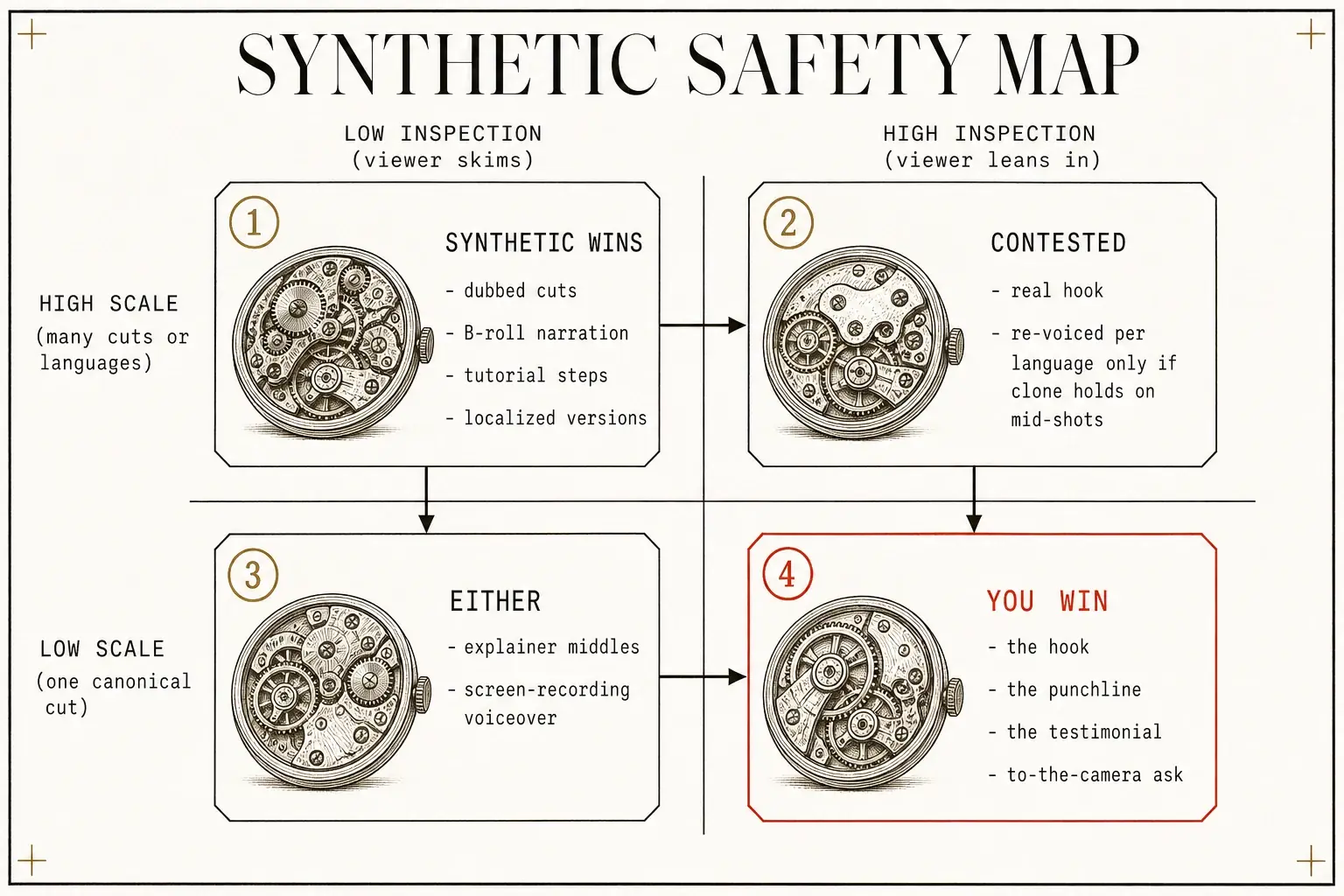
Put the two axes together, inspection (will they scrutinize the face and voice) and scale (how many cuts, languages, platforms), and the map falls out:
| Low inspection (viewer skims) | High inspection (viewer leans in) | |
|---|---|---|
| High scale (many cuts/languages) | Synthetic wins: dubbed cuts, B-roll narration, tutorial steps, localized versions | Contested: your real hook, re-voiced per language only if the clone holds on mid-shots |
| Low scale (one canonical cut) | Either: explainer middles, screen-recording voiceover | You win: the hook, the punchline, the testimonial, the to-camera ask |
"Even if you just record your own voice for one line in the video, like the intro or the final punchline, that goes a long way. Your real voice builds a connection with the audience."13
One line. The intro or the close. That's the high-inspection cell, and it's the cheapest insurance in this entire field. Synthetic does the volume, the human does the moments of contact. (This is the same tension as the factory-versus-cinematic split: quantity wins direct-response, where cost-per-acquisition is tested immediately, and quality wins high-ticket, where trust accumulates into a sale, @shalevhvs reported two $4,000 sales "from someone who doesn't exist," a self-reported claim, built on simple talking-to-camera clips.)
CH.05
Why is the voice the first tell, and should yours run local?
A bad voice is detected in the first second, before a single pixel is judged, which is exactly why it's the one corner you cannot cut.
The ear judges before the eye.
One faceless documentary channel spent $340 a month on premium voice but let an LLM write the script with no human eye on it, the first video got 12 views, top comment: "This sounds like a robot reading Wikipedia."8 The flip side is measured: swapping to top-tier AI narration on a 20-minute script retained viewers 22% longer, with about seven minutes of setup.14 The gap between a voice that holds and one that loses is neither subtle nor expensive.
flowchart LR
    S["Script, no human eye<br/>($340/mo premium voice)"] --> R["12 views:<br/>robot reading Wikipedia"]
    T["Top-tier AI narration<br/>~7 min setup"] --> H["+22% viewer retention<br/>on a 20-min script"]
Which makes local voice an unfair advantage for anyone who already owns the compute. The reflexive move is to treat ElevenLabs as the standard, it earns the reputation, scoring 4.4/5 for quality with inline tags like [whispers] and [laughs], and one creator hit 6,000-plus subscribers on roughly $11 of its Creator plan.151617 But the cost detonates quietly at volume: the $22/month Creator plan buys ~30–40 minutes of audio, make 5 videos a day and your voice line alone runs $99–$330 a month.18 A community of local-TTS operators explicitly discourages cloud TTS for production over cost, lock-in, and censorship risk:19
| Voice path | Voice quality (local-TTS roster, 2026) | Expressive control | Cost model |
|---|---|---|---|
| ElevenLabs (cloud) | 9/10, easiest cloning | 7.5/10 | ~$2–3 per 100k chars, spikes at scale |
| Chatterbox (local) | 8/10 | needs glue code | $0 per generation, GPU time only |
| Kokoro (local) | 7/10 | flat delivery | $0, CPU-friendly |
| Piper (local) | 4.5/10 | "strange noises" | $0, runs on a phone |
Source: local-TTS roster, 2026.19 Chatterbox is rated "the best free open-source starting point," with the honest catch printed next to it: it needs real glue code, segmentation, retries, timing, silence handling, pronunciation, and at scale it can throw artifacts. That glue code is the wall every hobbyist hits, and it's exactly the work an established audiobook stack has already done. The frontier proves expressive-local isn't a downgrade: IndexTTS-2.0, open-sourced by Bilibili's team with 10,000-plus GitHub stars, hit an emotion mean-opinion-score of 4.22 and a 1.883% word error rate, and lets you describe emotion in plain text ("surprise 0.45") instead of supplying a reference clip.20 The thing the cloud sells as its moat is now open weights.
The legal floor: keep the voice yours
There's a sharper reason to keep voice local: a cloned voice is a license, not a feature.
- Cloning splits into synthetic voices tied to no real person and clones of a real individual, and nearly all the legal exposure sits in the second.21
- Consent alone doesn't cover you, a license defines where, how long, and for what purpose, and if a use isn't written into it, assume you don't have the right.21
The betrayals are on record: two voice actors delivered Fiverr recordings believing they were "academic research only," then found their voices cloned inside Lovo's commercial product as "Kyle Snow" and "Sally Coleman", a landmark right-of-publicity case.22 And renting a clone of yourself hands your most personal identifier to a vendor whose terms can change, in February 2025 a major platform's terms briefly claimed perpetual rights to uploaded voice data before being walked back.23
The only voice you should clone is your own, under a license you wrote, on a model you control.
CH.06
The asset you actually own is the transcript
Stop thinking of the AI clipper as the product. The clipper is a commodity, the transcript underneath it is the lever. Every workflow starts by buying OpusClip and assuming the job is done. It isn't. OpusClip chews a 60-minute source in under five minutes and returns 10–15 clips ranked 0–100 on a "Virality Score," with auto-reframing and captions, 10 million-plus users, a $215M valuation off a $20M SoftBank round.2425
Then you read what people measured:
- 75% usable clips on clean solo audio but only 4 of 10 strong on multi-speaker.26
- Seven usable of 12 on a 22-minute video.27
- "Out of 20, maybe two or three publishable."28
The Virality Score runs on GPT-4 and underrates depth, one reviewer watched a Kubernetes clip score 85 while a genuinely surprising insight scored 42.27 For anyone whose edge is technical depth, an engine that rates depth as boring is working against you. And a credit is one minute of source, not one clip, so a 45-minute podcast burns 45 credits whether it returns 3 clips or 20.29 The honest verdict, from a G2 reviewer:28
By the time I finish fixing the things that don't look right, I've spent as much, if not more, time than I would have in Premiere.
So the real move is one layer up. The transcript is the searchable index that turns one recording into many pieces without rewatching it, for a solo builder, one long-form video into 10–20 short clips, 5–10 quote graphics, and 3–5 follow-up topics.30 The multiplication has named formulas: the 1-5-10 Rule (one long-form video → 5 Shorts → 10 posts) and the 3-2-1 Method (3 hooks, 2 how-to clips, 1 result clip).31 Moz maps one 10-minute video to 50-plus pieces and grounds it with a number worth keeping, one hour of audio is roughly 7,800 words.32 The transcript is also what the algorithm reads: a controlled study with 3Play Media found captioned videos saw a 7.32% lift in views (13.48% in the first 14 days), and a video ranked for a phrase that appeared only in the caption transcript.30
flowchart TD
    V["1 long-form video"] --> S["5 Shorts"]
    V --> P["10 posts"]
    V --> Q["5 to 10 quote graphics"]
    V --> T["3 to 5 follow-up topics"]
But abundance has a discipline problem. Repurpose the idea, don't reformat the clip, and never dump it all at once. Cropping one clip to four aspect ratios is the same content in four hats, a 10-minute "5 Frameworks" video should become five separate posts, each with its own platform-native hook.25 Short clips earn roughly 2.5× the engagement of long-form,33 and companies that repurpose report 3× the leads at 40–60% lower production cost (HubSpot and CMI data, via secondary sources).34 The trap on automation: bulk-dropping near-identical posts reads as spam to the algorithm, keep it to 1–2 pieces per platform per week, at least 48 hours apart, and map keywords so your blog, video, and show notes don't cannibalize each other.25 As one operator put it, "automating a broken content process only spreads the problem faster across more platforms."35
Where AI ends and craft begins
The seam between AI and craft is where quality lives. AI owns the mechanical layer and fails at the craft layer:
| AI owns (mechanical) | AI fails at (craft) |
|---|---|
| transcription-based editing, auto-captions | narrative pacing, emotional timing |
| filler and silence removal, rough clip selection | brand consistency, motion graphics36 |
Descript is the archetype of the AI-owned side, and its idea is worth stealing: edit the words, the media follows, one 47-minute podcast was edited in under seven minutes against 40-plus manually, with 127 of 143 filler words removed.27
Well-edited, factually-grounded AI content performs 12% better in AI-search citations than purely human work, while unedited AI content performs 34% worse.37
The editing pass isn't polish, it's the difference between getting cited and getting penalized. For the craft side, DaVinci Resolve is the only comprehensive free NLE with no watermark and no time limit, its $295 one-time Studio version adds AI scene detection, Magic Mask, and IntelliScript (auto-builds a timeline by matching script to dialogue), at the cost of needing 16GB of VRAM for the advanced tools.38
CH.07
Captions are the whole game, so render them yourself
Most people watch video with the sound off (74% of Facebook videos, 91% of LinkedIn viewers muted), so a video without captions is, for most of its audience, a video without words. The numbers aren't subtle:
- captioned videos retain viewers 31% longer and earn 38% more engagement,39
- 74% of Facebook videos are watched without sound,40
- 91% of LinkedIn viewers watch muted,41
- Meta measured a 12% average increase in ad view time with captions.30
The first decision is burned-in versus soft, and the platform makes it for you: hard-coded captions are the only reliable option on Instagram, TikTok, and YouTube Shorts (soft SRT/VTT files don't render consistently there), while long-form YouTube should use closed captions so viewers keep control and the transcript feeds SEO.4230
flowchart TD
    P{"Which platform?"} -->|"Shorts, TikTok, IG Reels"| B["Burn in hard-coded captions"]
    P -->|"Long-form YouTube"| S["Soft closed captions:<br/>viewer control + SEO"]
The accuracy gotcha is where a technical creator gets burned. Caption accuracy runs 90%-plus on clean single-speaker audio but drops to 80–85% on multiple speakers, and no tool handles domain terminology without custom vocabulary.26 OpusClip's captions are ~95% accurate on clean audio but fail exactly where your credibility lives, brand names like "Anthropic," "Claude Opus," "GPT-5.5," and "Llama 4."29 A caption that renders "Llama 4" as "llama for" isn't a typo, it's a signal that nobody's home. For a builder whose differentiator is technical depth, edited captions, not auto, are required to preserve credibility.30
For anyone with a GPU and local Whisper already running, paying a per-minute SaaS to burn captions is paying rent on a machine you own. FFmpeg 8.x has Whisper built in, and one command does the job:
ffmpeg -i input.mp4 -vn -af "whisper=model=ggml-base.bin:language=auto:queue=3:destination=output.srt:format=srt" -f null -
Turning on use_gpu=true "makes a huge difference," and model choice is a clean trade-off:
tiny(~39MB) is fastest.base(~142MB) balanced.large-v3(~3.1GB) most accurate.43
One Windows trap that costs an hour: the subtitles filter fails on non-ASCII paths, so keep paths plain ASCII.44 The cost case is stark next to a machine you already power on: OpenAI's hosted Whisper is $0.006/minute and doesn't even identify speakers (diarization adds $0.003–$0.01/min on top).45 Small per file, not small across a program running hundreds of clips a month on a rig where the marginal cost is electricity.
Karaoke captions and the GDPR edge
There's a compliance edge too: since voice recordings are biometric data under GDPR, local transcription sidesteps the data-transfer question entirely.46 Word-level "karaoke" captions are a solved open-source problem, nikhil-reddy05/auto-captions and jurczykpawel/captions-cli (presets like hormozi and glow) burn them with Whisper + FFmpeg, the latter fully offline.4748 The single most important setting for vertical video: set PlayResX=1080, PlayResY=1920, and a bottom margin of 120–180 to keep captions clear of the platform UI.47
One taste warning, against over-automation: on TikTok, viewers cite full-screen burned-in captions as a reason to hit "Do not recommend," and Shorts are full of poorly-punctuated, over-animated burned subtitles that actively frustrate.49 Burn where the platform forces it, keep them clean, and don't animate every word.
CH.08
Local or cloud? The VRAM floor and the break-even
There is no single best video model, the market split into tiers and the leaderboard reshuffles monthly, so "which model" is a category error. The real question is where each job runs, and it's the same inspection-versus-scale rule, now with a hardware floor. As of May 2026, one Video Arena ordered the top names, and a parallel cut put Alibaba's HappyHorse-1.0 #1 without audio at 1,357, two reputable sources, two number sets, same top names:5051
| Model | Video Arena rank | Elo |
|---|---|---|
| Seedance 2.0 | #1 | 1,222 |
| Kling 3.0 Omni | #3 | 1,106 |
| Veo 3.1 | #5 | 1,102 |
| Sora 2 | #8 | 1,088 |
Chinese-developed models (Kling, Hailuo, Pixverse) consistently lead output quality, with Veo 3 the first US model to close the gap.52 And the cautionary tale the field now points at:
OpenAI's Sora 2 had the best demo and didn't survive, reportedly burning $15M a day in inference against $2.1M of lifetime revenue, with the consumer app reportedly shut and the API winding down.53 The best demo doesn't win, the one that survives does.
What you can self-host depends on a distinction that decides everything: open weight (download and run it) versus open source (you also get the training code). Most state-of-the-art video models are open weight, treat that as the line, because you can self-host it. LTX-2 comes closest to genuinely open source.54 The trap is that "open" can mean "open until the next version": Alibaba's Wan 2.5/2.6 are API-only with no public weights, so a self-hosted build pins to a version that actually ships weights, the larger Wan 2.2 I2V A14B or a small open variant like the Wan 2.7-1.3B in the table below.55 Build on a version, not a brand.
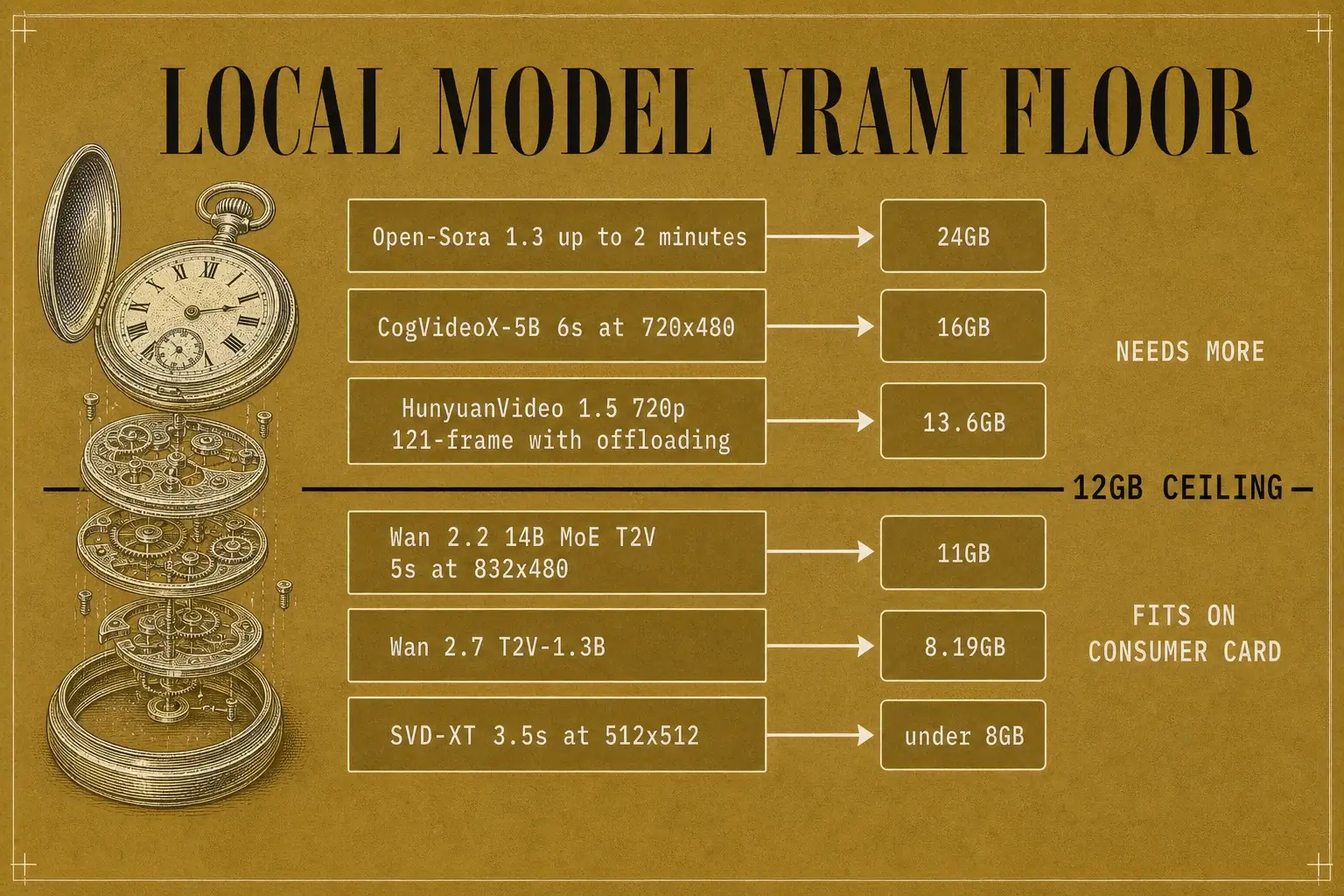
Then the hard floor: VRAM. Quantization barely moves it for video (the "2GB per billion parameters" rule is an LLM heuristic, video has fixed floors, and shrinking precision can add visible blur at 480p).56 What actually fits, measured by people who ran it:
| Model | VRAM | Note |
|---|---|---|
| SVD-XT, 3.5s @ 512×512 | under 8GB | image-to-video57 |
| Wan 2.7 T2V-1.3B | 8.19GB | text-to-video51 |
| Wan 2.2 (14B MoE) T2V, 5s @ 832×480 | 11GB | squeezes onto a 12GB card57 |
| CogVideoX-5B, 6s @ 720×480 | 16GB | doesn't fit 12GB without help57 |
| HunyuanVideo 1.5, 720p 121-frame, w/ offloading | 13.6GB | both T2V/I2V51 |
| Open-Sora 1.3, up to 2 min | 24GB | off the table on consumer cards58 |
Read against a 12GB ceiling: the small models are comfortable, the 14B models squeeze in at 480p only with GGUF quantization plus layer-streaming tricks like wanBlockSwap (one Dockerized RTX 3060 build peaks at ~11.4GB and drops to 480p or fewer steps when it OOMs), and the H100-class avatar models don't fit at all.5960 On 12GB, you are a 480p machine, and you stay under the line on purpose.
The two paths have opposite cost shapes. Local costs almost nothing per clip and everything in time: roughly $0.0009 of electricity per minute of GPU compute on a used RTX 3090 ($700–$900, the budget champion), but 15–20 minutes of render for a single 5-second clip at 480p, call it three to four hours of pure render for one minute of finished video.5659 Cloud flips every term: instant, any length, 1080p/4K, often with native audio, metered per second, and the meter doesn't stop for failed renders.
| Model (cloud API) | Price | Note |
|---|---|---|
| Veo 3.1 Lite (720p) | $0.05/s | cheap end of the spread53 |
| Veo 3.1 (with audio) | $0.03/s | native audio saves separate sound work61 |
| Veo 3 Ultra | $0.50/s | expensive end53 |
| Seedance 2.0 Fast (1080p) | $0.09/s | cheapest production-quality, per Atlas61 |
| Kling 3.0 | $0.07/s | 65% cheaper than Sora, per source53 |
| Runway "Unlimited" | $76/mo | "relaxed" speeds, 30–40% failure rate62 |
Two things wreck the sticker prices: the same model costs different amounts through different gateways, and these assume the clip works first try, iteration multiplies the effective price ~3×, and rejected prompts still consume credits with no refund.6162 One creator described the moment "FAL.AI's credit counter hit zero mid-render… I'd burned through $200 in two days generating B-roll for a single video," renting Wan 2.6 at $0.05/second.63 (The worse version of that story, a metered job left to loop unattended overnight, is the silent-failure problem the autonomous pipeline note covers, the lesson that transfers is simple: anything metered and automated needs a hard spend cap before it needs a single feature.)
So the decision rule, and it's the inspection rule wearing a hardware hat:
Below ~50 clips/day, rent. Above ~150 clips/day, self-host. In between, do both: run the bulk volume on your local 480p batch, and spend cloud credits only on the ~20% of hero content that has to look its best.
flowchart TD
    Q{"Clips per day?"} -->|"Below ~50"| R["Rent cloud"]
    Q -->|"~50 to 150"| H["Do both:<br/>local 480p bulk + cloud heroes"]
    Q -->|"Above ~150"| L["Self-host"]
Self-hosting's break-even versus Runway lands at 50–150 clips per day,55 and the GPU is the cheap part, the parallel case of self-hosting Whisper shows true break-even shifting far higher once you add engineering time, so real self-hosted cost can land 3–5× the raw GPU-instance price.4564 One hidden cost decides the edges: egress. Moving large volumes out of a cloud can dwarf the generation bill (1PB out of AWS runs ~$53,800/month), so if you generate in the cloud and pull everything home to edit, budget the transfer.65
What the local cards are really for
Map it to two 12GB cards and it resolves cleanly: you're nowhere near 150 clips a day by hand, so on raw economics you rent, but your local cards aren't for hitting a break-even, they're for the jobs cloud can't do: unlimited overnight batches at zero marginal cost, total privacy, and free prompt iteration before you spend a cloud credit. That's the low-inspection 80% lane, in your basement, at 480p. The cloud is the high-inspection 20% lane, in 1080p with audio. The same question that placed your real face also placed your GPU.
CH.09
Which tools should you actually use?
There is no best-of-everything stack, only the right tool per job. Here's the production stack across both camps, deduped (generation models live in the chapter above):
| Job | Primary | Alternatives | Why / the catch |
|---|---|---|---|
| Creative direction / prompts | Claude (Opus or Haiku) | GPT-5.5 | Haiku for volume, Opus for anchor pieces |
| Static images + editing | Nano Banana / Nano Banana Pro | GPT Image 2, Midjourney | Nano Banana edits one element without regenerating |
| Long-to-short clipping | OpusClip | Vizard.ai, Choppity, Subscut | per-minute credits, weak on multi-speaker, Choppity trims to complete thoughts |
| Mechanical / transcript editing | Descript | n/a | edit words, media follows, metered "media minutes" can spike |
| Finishing / NLE | DaVinci Resolve | CapCut, Premiere | Resolve free + no watermark (16GB VRAM for AI tools), CapCut for grain/desaturation/captions |
| Animated captions | Submagic, captions-cli |
CaptionRich | or render locally with FFmpeg + Whisper (see above) |
| Voice / audio | local (Chatterbox / IndexTTS-2.0) | ElevenLabs | own the compute → local wins, cloud for one-offs |
| Talking-head avatars | HeyGen | Synthesia | demos / tutorials only, credit model hard to forecast |
| Dubbing / localization | HeyGen (40+ / 175+ languages) | n/a | the one place synthetic scales wide |
| Orchestration / distribution | n8n, Repurpose.io | Make, Zapier | Repurpose distributes, doesn't clip, pair with a clipper, see the pipeline note |
| Scraping / sourcing | Apify | n/a | pull trending posts and product data |
| Video generation | → see "Local or cloud?" above | Seedance / Veo / Kling / Wan / LTX by VRAM and job |
The deepest truth under the table is one @AIWarper hints at: "the tool wants to work." These models aren't adversaries, they're probability engines producing the most likely output for their training data. Annotation, reference sheets, storyboards, structured JSON, project memory, an edited transcript: none of them guarantee the right result.
They make it more probable. That's the whole job.
The local-first version of this stack is real and runs at the cost of electricity plus a distribution subscription. The under-exploited move for a builder is video-as-code: Remotion treats videos as React components, which means git-diff versioning and instant re-render, one creator reported a first reel taking ~3 hours, the second 90 minutes, then under an hour, turning an agency's $300–$1,000, multi-week quote into a weekend.66 Isaac Flath built what he calls a "$10,000 product video" in 2 hours with Remotion and ~200 Claude Code exchanges, zero prior video experience.67 And the primitive under all of it is FFmpeg as both renderer and quality checker, as one builder put it, "make evaluators first-class, every creative pipeline should have a cheap is-it-good? check," whether that's scene-change detection or silence-and-black-frame chaptering, all a single FFmpeg command.68
CH.10
What nobody promises you
The production gains are real. The revenue screenshots are not audited. Every dollar figure attached to a creator in this space, the monthly incomes, the $8,000 in sales "from someone who doesn't exist," the per-day ad counts, is self-reported, not verified. "500 ads a day" is a production metric, not a profitability one. Treat them as creator claims, because that's what they are. The honest limits, stated flat:
- Human judgment doesn't leave. Sources note the need to strip "corny claude lingo" and grind through the 200–300-view "posting into the void" stretch of the first 30 days. The factory automates production, not strategy. The pattern that scales is "human-led outline + AI drafting + human-edited final," and "the editing is what separates the channels that scale from the ones that flame out."69
- Platform risk is real and rising. YouTube already demonetizes channels it reads as "repetitive, low-effort content," and faceless channels are the most exposed. Every major network now requires a label on AI-generated content, and cloning someone without consent creates both legal and ban risk.23
- The AI-plastic look isn't fully solved. Post-processing helps, but pixel-peepers still catch facial micro-expressions and hand movement. It works because it optimizes for the 95% scrolling at 2× speed, not the 5% inspecting frames, which is the inspection rule, one more time.
- Should you reveal the influencer is AI? One view says reveal later for a "secondary spike", the counter is platform risk, since a reveal that goes wrong can get you demonetized. The durable call: disclose early if you're building a long-term asset (position it as "AI-enhanced," not "AI-faked"), conceal only for a short arbitrage play you're prepared to lose the account over. The ethical line is also the business line, brands paying premium for AI UGC want disclosure, not deception.
- Nothing runs unattended forever. API changes, model updates, and policy shifts all demand ongoing attention. The honest ceiling, from people who ship: "7/10 quality uploaded weekly beats a 10/10 uploaded monthly."7 Fully-automated done-for-you generators "rarely match what a $30 freelancer produces."70
CH.11
Your action plan, and how to verify it worked
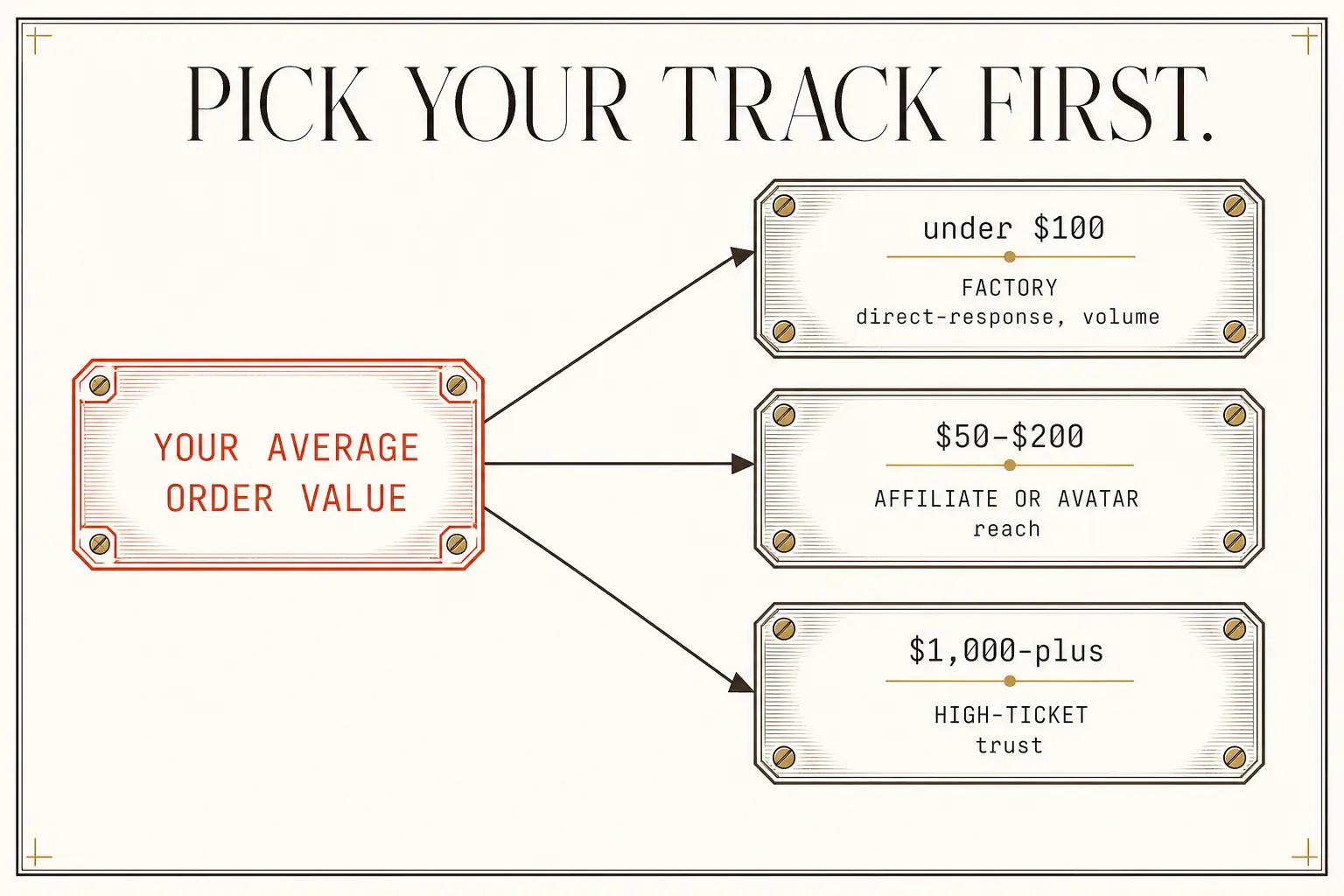
Pick your track first, everything downstream depends on it.
- Average order value under $100 and you need volume: you're a factory (direct-response).
- $50–$200 and you need reach: you're an affiliate/avatar play.
- $1,000-plus and you need trust: you're high-ticket.
Write down your target acquisition cost before you generate a single frame.
Shared foundation (Day 1)
Lock the character: generate 4–6 reference images in GPT Image 2, varying angle, expression, and lighting but keeping core features identical, the sheet is your source of truth, not the video prompt. Storyboard first: "create a 4×4 storyboard, 16 frames" with shot types and emotional beats, so the narrative is solved before the video model has to invent it. Test-generate: feed storyboard + references into Seedance 2.0, and iterate on the references, not the prompt.
Cinematic track
Annotate critical frames (mark effects and positions directly on the image). Build a director-style prompt template, [shot] [camera move] [action] [lighting] [mood] [constraints]. A concrete shape to copy: "SHOT 1: close-up of product on dark surface, camera slowly pushes in. SHOT 2: product in use, medium shot, natural light from left. SHOT 3: hero shot, low angle, product glowing, lens flare", each shot its own lighting and motion line, "no lens flares except shot 3." Document color palette, lighting direction, and lens as continuity constraints fed into every generation.
Factory track
Stand up your distribution and generation loop, then scale to ~100 assets in a day and measure cost per usable asset. (The orchestration itself, schedulers, checkers, state, spend caps, is the autonomous pipeline note.)
How you know it worked:
- Character consistency: overlay your reference sheet on each frame at 50% opacity, features, clothing, and proportions should align across 5-plus shots with no morphing.
- Temporal stability: play the sequence at 2× speed, where floating objects, disappearing props, and lighting jumps become obvious. Smooth at 2× means right at normal speed.
- JSON respect: generate two clips identical except one field (
camera_tilt: 15vs0), if the output difference matches the parameter difference, your structured layer is being honored. - Factory economics: measure cost per usable asset and time saved against targets, under $0.50 per usable static asset, under $2.00 per usable video, under 20% of previous production time for equivalent output. Miss them and the bottleneck is almost always orchestration, not generation, fix it at the loop, not the tools.
The creators shipping cinematic AI video aren't waiting for better models, and the ones running factories aren't either. Both stopped asking "is it good enough yet?" and started building better interfaces between their intent and the machine's output. The prompt was free. The architecture, the reference sheets, the transcript, the captions, the placement of your real voice, the choice of where each second renders, costs effort. The architecture is the only part that works.
The 2 skills behind this note
- Sign in to open
Write the X posts
Writes ONE source (a research run, the canonical article, or a raw file) into an X/Twitter-native SHORT-FOR...
- Sign in to open
Write the LinkedIn post
Turns ONE source (a research run, the canonical article, or raw notes) into a native LinkedIn package
KEEP GOING
Take this with you.
Sources · 71
Sources
-
Frontiers in Psychology, Psychological mechanisms linking AI hallucinations to user trust and behavioral intentions toward AI-generated videos ↩
-
California Management Review, Authenticity in the Age of AI ↩
-
MindStudio, How a Marketing Agency Scaled Video Production 10x with AI ↩
-
LipSynthesis, AI vs Human Video Performance: What the Data Says ↩ ↩2 ↩3 ↩4
-
DeepReel, Best AI Video Makers for YouTube Creators in 2026 ↩ ↩2
-
Overseeros, Best Faceless YouTube Automation Tools in 2026 ↩ ↩2
-
LinkedIn (Mirza Ahmad Baig), Top 10 Best AI Tools for Content Creators in 2026 ↩
-
HeyGen, April 2026 release (Avatar V, Instant Highlights v2) ↩
-
r/AIIncomeLab, 50K Subscribers, 6M Views, Still Not Monetized ↩
-
r/YouTubeCreators, What AI tools are best for creating long-form YouTube content? ↩
-
ElevenLabs, Free Text To Speech Online with Lifelike AI Voices ↩
-
r/LocalTextToSpeech, My TTS list of 2026: All voices, all models and engines compared ↩ ↩2
-
Baidu, IndexTTS-2.0: Bilibili's open-source text-to-speech model ↩
-
Skadden, New York Court Tackles the Legality of AI Voice Cloning ↩
-
r/ShareAiPrompts, SelfCloner Review (incl. the February 2025 ElevenLabs ToS controversy) ↩ ↩2
-
autoposting.ai, Best AI Video Repurposing Tools in 2026 ↩ ↩2
-
checkthat.ai, OpusClip Reviews 2026: What 550+ Users Actually Think ↩ ↩2
-
creatortribune.com, Opus Clip Review: Worth It For Solo Creators in 2026? ↩ ↩2
-
increditors.com, Subtitles and Captions Data: How Closed Captions Impact Views and Retention ↩ ↩2 ↩3 ↩4 ↩5
-
moz.com, How to Turn One Piece of Content into Multiple for SEO ↩
-
thegrowthterminal.com, Content Repurposing: One Idea, Five Platforms, No Burnout and tofuhq.com, Top AI Tools for Repurposing Content ↩
-
increditors.com, AI Video Editing vs Human Editors: What Actually Works in 2026 ↩
-
createswowtech.com, 25 AI Tools for Content Creators in 2026 ↩
-
sproutsocial.com, 80+ Social media video statistics marketers need to know in 2026 ↩
-
dev.to (Kyle), Auto-Caption Generation: Whisper + FFmpeg in a Node.js Worker ↩
-
webrtc.link, FFmpeg Whisper Filter Guide: Generate Video Subtitles ↩
-
32blog.com, Auto-Generate Subtitles with FFmpeg and Whisper ↩
-
brasstranscripts.com, Whisper API Pricing (2026): $0.006/min vs Self-Host Costs ↩ ↩2
-
r/PartneredYoutube, Do you burn captions into your videos? ↩
-
digitalapplied.com, AI Video Market After Sora: Runway, Kling, and Veo ↩ ↩2 ↩3 ↩4
-
deepbeepmeep, Wan2GP / WanGP (closed vs open-weight vs open-source taxonomy) ↩
-
spheron.network, Image-to-Video AI on GPU Cloud: LTX-Video, Wan 2.2 I2V, Hunyuan Video Avatar (2026) ↩ ↩2
-
noviai.ai, Best GPU for LLMs & AI Video Generation (2026) ↩ ↩2
-
Guaardvark, r/OpenSourceAI (concrete local model VRAM footprints) ↩ ↩2 ↩3
-
resource.digen.ai, 8 Best Open Source AI Video Generator Alternatives (2026) ↩
-
binkiewka, z-image-turbo-local (RTX 3060 12GB image-to-video build) ↩ ↩2
-
zysilm, ai-video-producer-skill (Wan 2.2 + Qwen keyframes via ComfyUI) ↩
-
atlascloud.ai, Cheapest AI Video Generation APIs (2026) ↩ ↩2 ↩3
-
virvid.ai, All-in-One vs Specialist AI Video Stack (2026) ↩ ↩2
-
theneuralbase.com, Comparing to self-hosted cost (Whisper API course) ↩
-
backblaze.com, Scaling Generative AI Video Depends on Your Data Egress Strategy ↩
-
r/ClaudeAI, I delayed my product launch for months because I couldn't afford demo videos ↩
-
elite-ai-assisted-coding.dev (Isaac Flath), The $10,000 product video for $0 ↩
-
Kompozy, AI faceless YouTube: the 2026 niche map and tool stack ↩
-
faceless.my, Best AI Tools for Faceless Content Creation (2026 Stack) ↩
Loading the discussion…
Sign in to join the discussion. It's free.