Automation & workflows — 2026-06-27PUBLIC
No-code automation that survives production: the data model, the failure modes, and the build sequence for durable n8n workflows
No-code tools like n8n make automations easy to build and easy to rot in production. This field guide covers the data model, the four failure modes, the workflow-versus-agent call, a global error logger, and an 11-step build sequence for workflows that survive real inputs.
≈ 21 min read
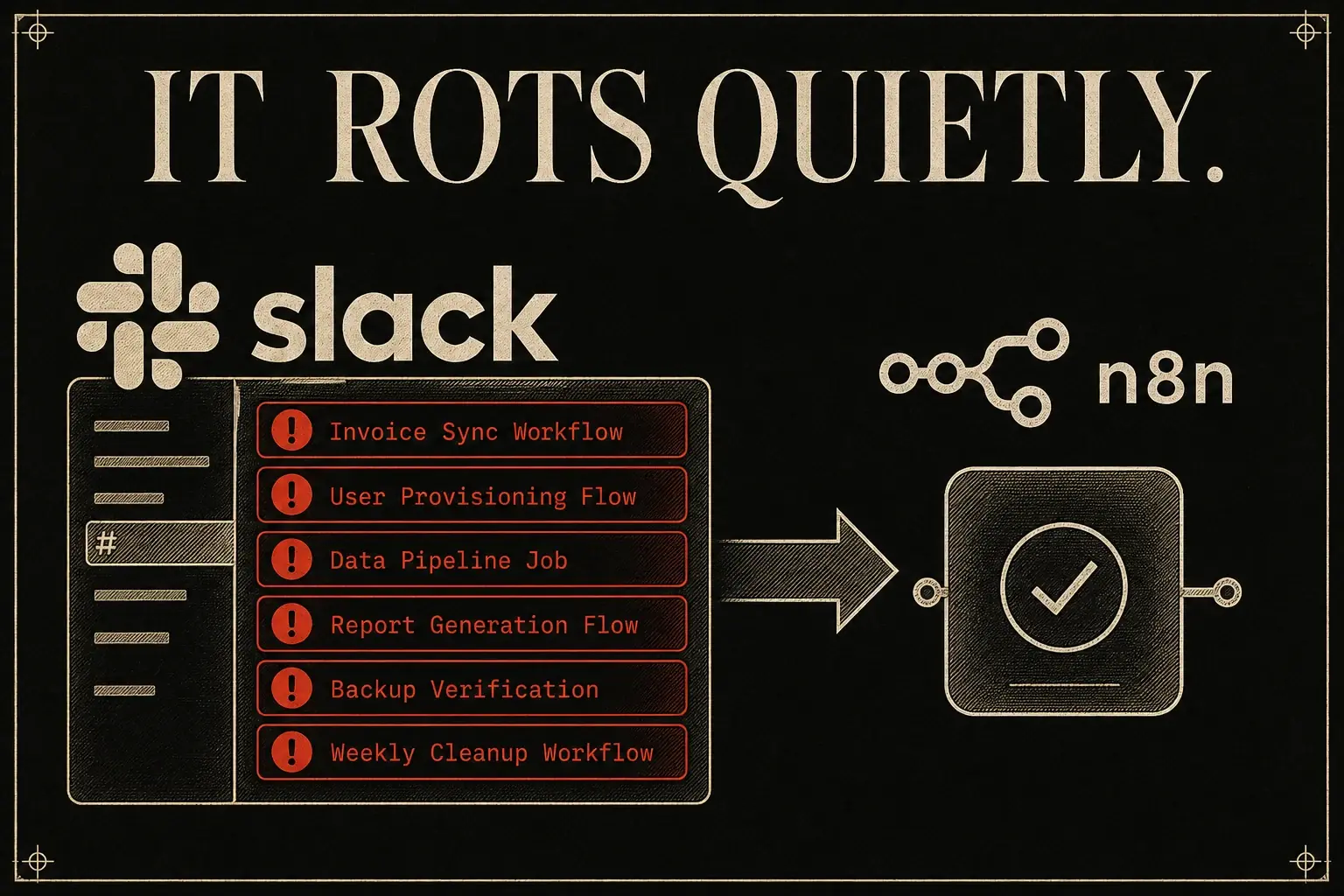
The demo is flawless. You drag the nodes, wire them together, hit deploy, and for one beautiful afternoon the business runs itself. Then it rots, quietly, the way these things always do:
- The trigger fires, but the API key expired three days ago.
- The model returns a clean response, but the JSON has a trailing comma and the next node chokes on it.
- The workflow runs green, processes an empty array, and emails nobody, and no one notices until the client does.
Anyone who has woken up to a Slack channel flooded with error notifications already knows the thing the no-code canvas works hard to hide:
"no-code" does not mean "no thinking."
The tools are accessible. The discipline that makes them reliable is not.
That gap is the whole subject here. Across the 2026 field (full n8n courses, Make tutorials, AI-agent builds, homelab walkthroughs, the "you should learn X instead" think-pieces) the operators who actually ship durable systems converge on one argument even when they disagree on tooling:
Reliability is not a property of the platform you pick. It is a property of the data model you understand, the failures you design for, and the inputs you test against before you ship.
The flashy prototype and the system that holds up are built by the same hands, on the same canvas, using the same nodes. The only difference is discipline. (Income and reach claims floating around this field are creator-reported, not verified. Hold them at arm's length.)
What follows pulls that discipline apart:
- the data model under the canvas,
- the four failure modes behind most production incidents,
- the workflow-versus-agent decision most people get backwards,
- the expression idioms that turn a brittle script into a system,
- a global error logger,
- a sequenced build plan where every step carries a check you can actually run.
Where the field oversells its own future, this note flags it as a prediction, not a fact.
CH.01
Why do most no-code automations fail?
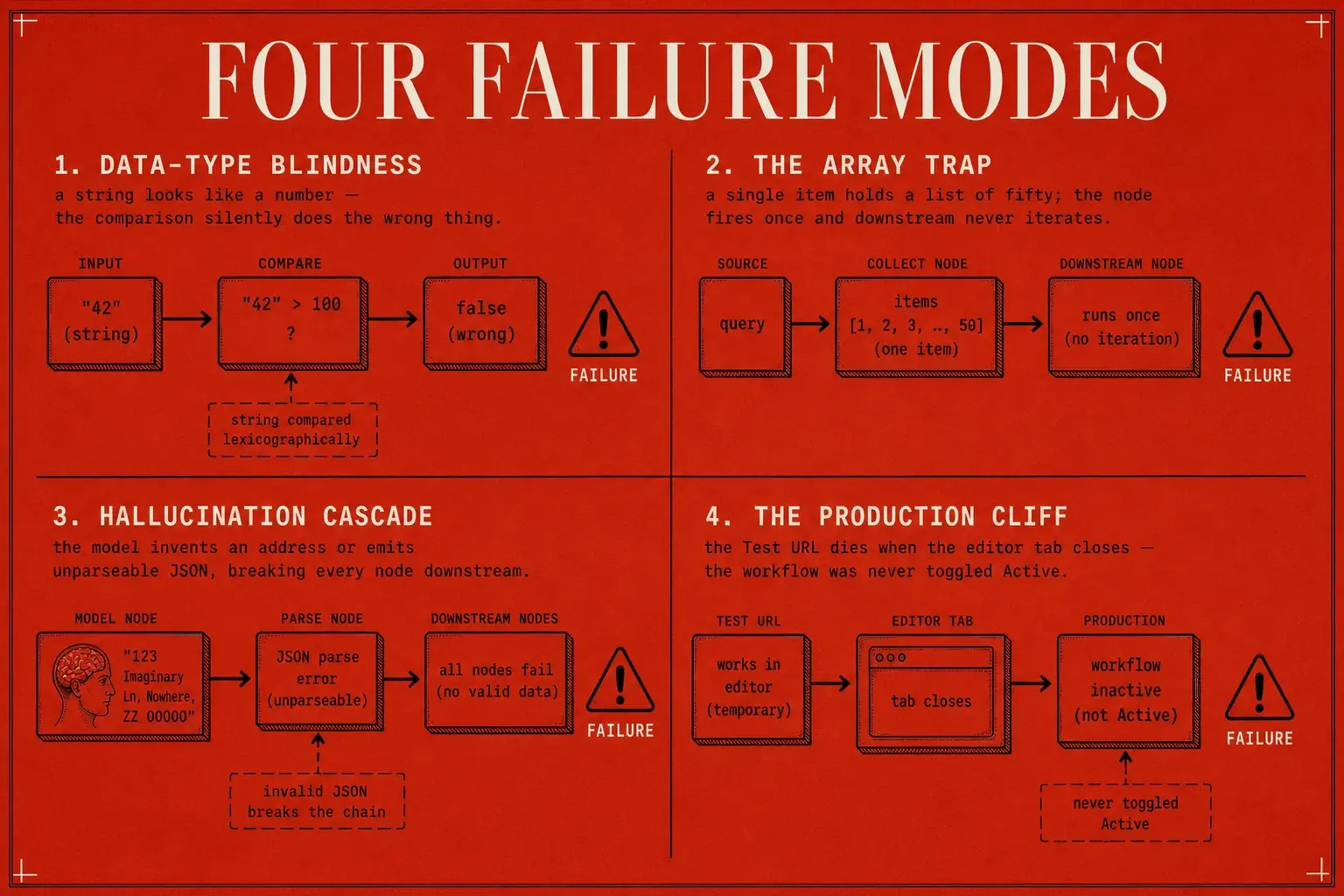
The failure modes are remarkably consistent across platforms and operators, which is the first clue that they're structural, not bad luck. Four account for the bulk of production incidents, and all four trace back to one root cause: not understanding what the platform is doing with your data.
Data-type blindness. A node returns a string that merely looks like a number (
"123"instead of123) and a filter likeage > 50silently does the wrong thing, because you cannot do arithmetic on text. n8n's Set / Edit Fields node forces you to pick a type (String, Number, Boolean, Array, Object) precisely because this bites everyone. Pick wrong and the comparison fails without ever throwing, the worst kind of failure, the invisible kind.The array trap. n8n wraps every node output in an array of objects, even a single item. So a node that receives one item (which happens to contain a list of fifty leads) executes once, against the one object holding the array. The downstream step never sees fifty leads. It sees one. The result is a "personalized" outreach workflow that fires fifty identical emails, because the step meant to run per-lead ran a single time. Beginners rarely check how many objects the previous node is actually emitting, then hit "item not found" the moment they assume there's exactly one.
The hallucination cascade. Feed a model vague instructions and no guardrails and it will confidently invent a contact address, emit JSON the next node can't parse, or loop forever trying to call a tool it doesn't have. The intelligence layer fails open, not closed. It produces something plausible-looking that breaks everything downstream.
The production cliff. The workflow tests cleanly against the editor's Test URL, then does nothing in the wild, because the Production URL only works when the workflow is toggled Active, and nobody toggled it. The Test URL listens only while the editor tab is open. Close the tab and the demo dies, because the real endpoint was never switched on.
These are not edge cases. They're the default outcome of building without understanding the data model. Everything below is the antidote.
CH.02
How does n8n actually structure your data?
Every piece of data inside n8n is an array of objects. Internalize that one sentence and the single largest class of "platform bugs" disappears, because most of them are really you misaddressing your own data.
Even a single form submission arrives wrapped: [{ "firstName": "Ada", "email": "ada@example.com" }]. The outer square bracket is mandatory and always present. Each item inside is an object of key-value pairs. The UI hides this behind a friendly table view, which is exactly why people get burned.
Always confirm the shape in JSON view, not just Table view. When a node "loses" an item or fires the wrong number of times, the JSON view shows you why in seconds.
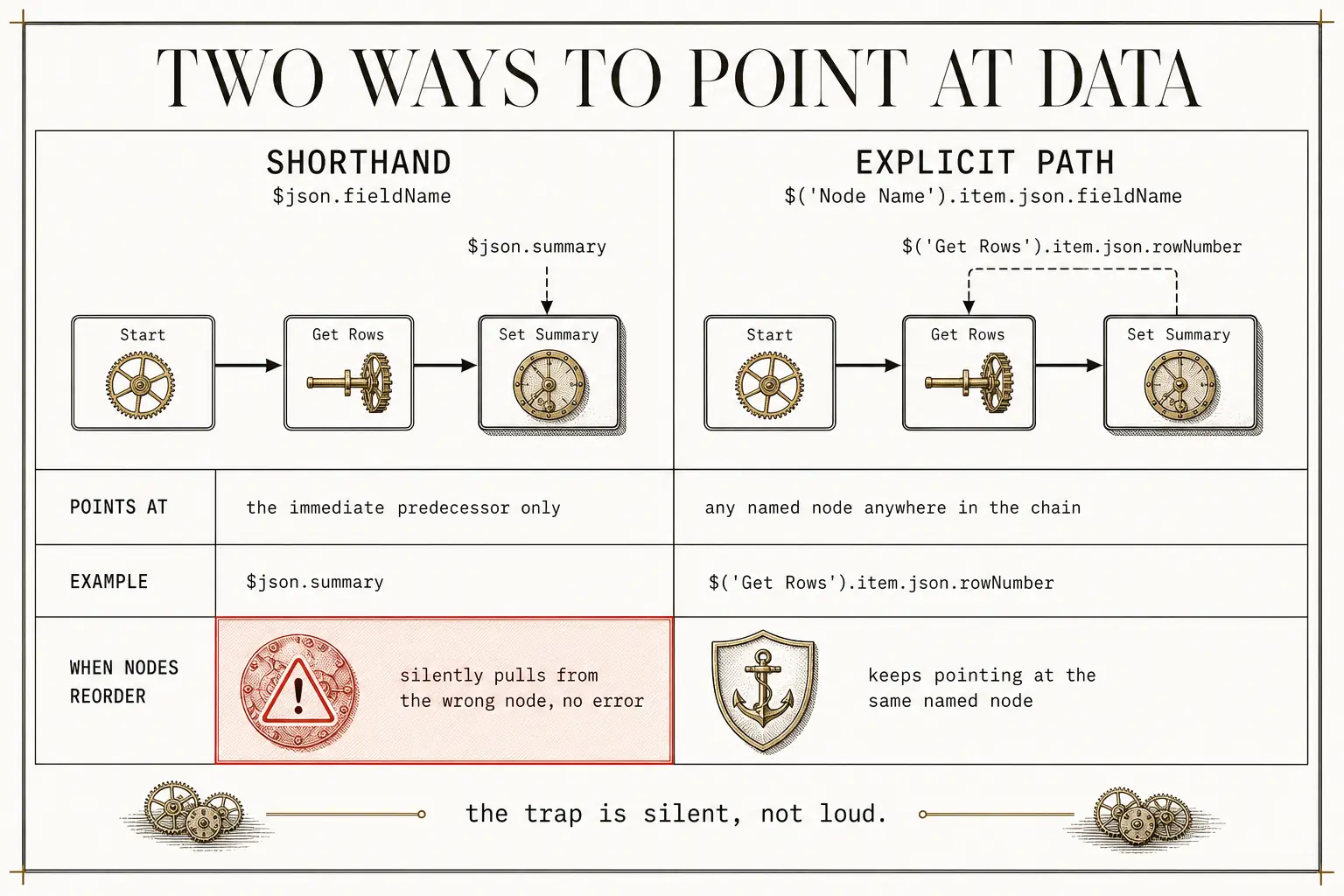
Referencing that data has two registers, and the gap between them is where most beginners break:
- The immediate predecessor uses the shorthand
{{ $json.fieldName }}. This is also what the UI generates when you drag a field from the panel into a node. - A node further back in the chain (whose payload has since been overwritten by intermediate nodes) needs the explicit path:
{{ $('Node Name').item.json.fieldName }}. The.item.jsonlayer is real and always there. Omit it and the expression quietly evaluates to empty.
The silent-break trap
The trap is a silent break. You drag a variable, it populates in a test run, and you assume the reference is solid. But the drag generated {{ $json.summary }}, which only ever points at the immediate predecessor. The day you reorder nodes or slip a branch in between, that reference starts pulling from the wrong place, no error, just wrong data. The canonical example: a Google Sheets "Get Rows" operation returns a row number you need later in an "Update Row," but several nodes have processed the data in between, so the shorthand no longer reaches it. You need the full {{ $('Get Rows').item.json.rowNumber }} path. When a downstream value goes empty right after you rearranged the canvas, check this first.
The spaces problem
If your source headers contain spaces (a Google Sheet column literally named First Name) dot notation throws a parser error, because {{ $json.first name }} is not valid syntax. The escape hatch is bracket notation with single quotes: {{ $json['first name'] }}. The cleaner move, when you control the source, is to enforce camelCase (or join words with _) in your headers from the start, so this whole class of error never exists.
CH.03
When should you use expressions, and what can they actually do?
The rule is nearly absolute: use expressions almost everywhere, and reserve fixed fields only for static values that never change, an internal notification address, a constant tag. Anything that should vary with the input must be an expression. Toggling a field from "Fixed" to "Expression" is what enables dragging variables and the {{ ... }} syntax that turns a one-shot script into a workflow that absorbs whatever input arrives.
The payoff most builders miss is that expressions let you chain JavaScript methods directly onto your data, turning the canvas into a real transformation layer:
| You have | You want | Expression |
|---|---|---|
| A messy HTML email body | Clean text | {{ $json.body.removeTags().trim() }} |
| An array of scraped text elements | One string for the model | {{ $json.data.join('\n') }} |
| A user-submitted URL | A validity check before processing | {{ $json.url.isURL() }} → boolean |
| A long block of text | A rough token estimate before a model call | {{ $json.text.length / 4 }} (≈4 chars/token, a rough heuristic) |
| Any model prompt | The model to know what "today" is | {{ $now }} |
| A header with spaces | A reference that parses | {{ $json['first name'] }} |
These aren't party tricks. They're the operational layer that separates a workflow that breaks on the first messy real-world input from one that absorbs it. The token-estimate one-liner is a guardrail in disguise: divide character length by a rough four-characters-per-token figure and you've estimated how big a chunk is before you send it, quietly heading off a context-overflow failure downstream. And {{ $now }} in a prompt is the whole difference between a model that knows the current date and one that confidently writes about last year.
CH.04
Should you build a workflow or an agent?
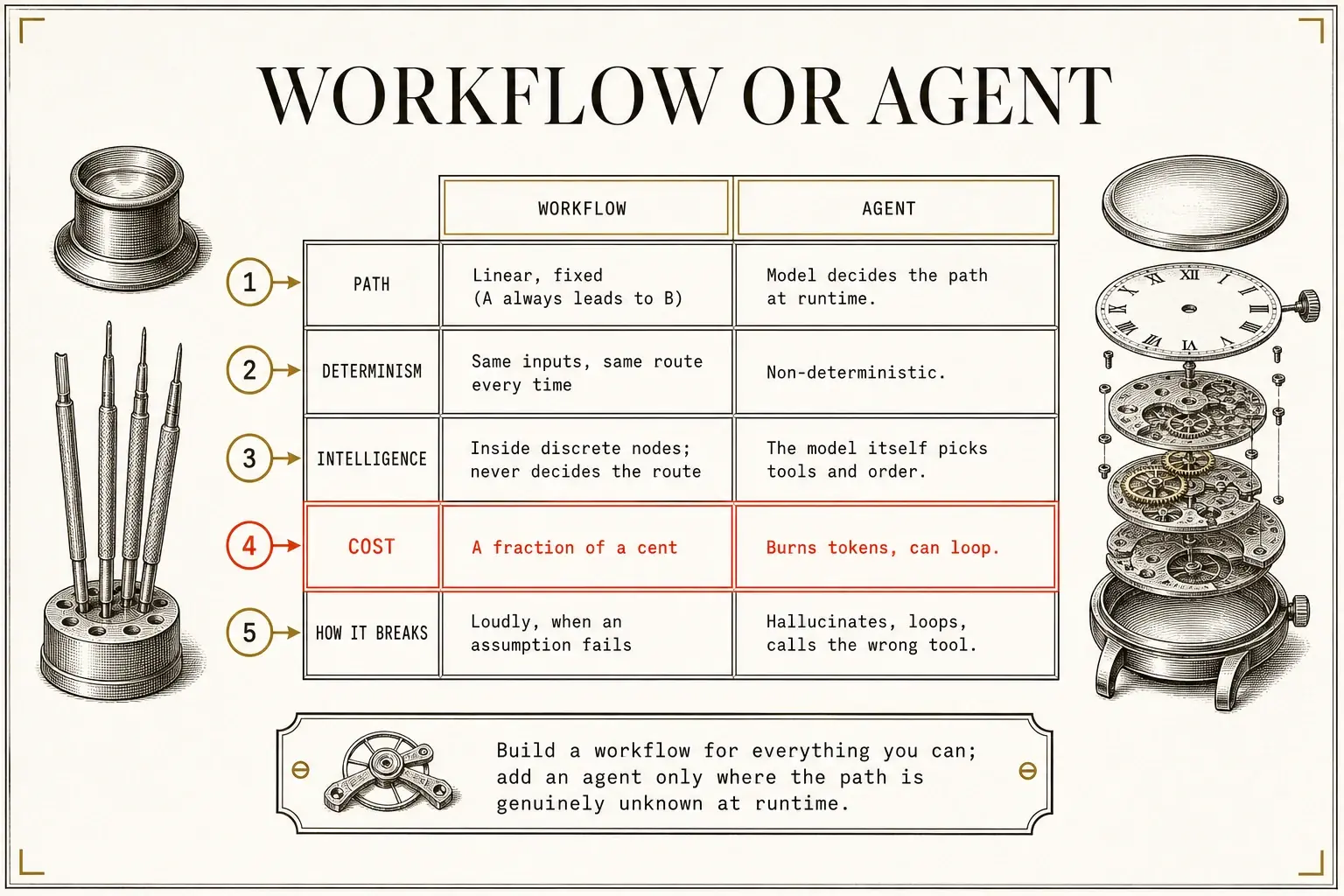
Use a workflow for everything you possibly can, and reach for an agent only when the path to the goal is genuinely unknown at runtime. This is the most consequential design decision in any build, and most people over-engineer it: they reach for an agent when a workflow would do, and buy themselves cost, latency, and a hallucination surface for exactly zero additional capability.
The distinction is clean:
| Workflow | Agent | |
|---|---|---|
| Path | Linear, fixed (A always leads to B) | The model decides the path at runtime |
| Determinism | Same inputs, same route every time | Non-deterministic |
| Where intelligence lives | Inside discrete nodes. Never decides the route | The model itself picks tools and order |
| Cost | A fraction of a cent | Burns tokens, can loop |
| How it breaks | Loudly, when an assumption fails | Hallucinates, loops, calls the wrong tool |
The test that operationalizes the rule is a whiteboard one: can you draw the complete flowchart with every branch labeled? If you can, build a workflow. If the process needs the model to reason about which branch to take based on content it hasn't seen yet, add an agent, but only at that one decision node, not across the whole pipeline.
flowchart TD
    Q["Can you draw the full flowchart<br/>with every branch labeled?"]
    Q -->|Yes| W["Build a workflow"]
    Q -->|No| A["Add an agent at that one decision node only"]
Two examples mark the boundary, both pure workflows:
- A customer-support email router: trigger on an inbound email, run a text classifier to categorize it, route to the right branch, act. No model needs to decide the route.
- Scraping a competitor's pricing page on a schedule and emailing yourself the diff. Fetch, compare to the last version, send. It costs almost nothing and breaks the instant the competitor renames a CSS class, which is fine, because it breaks loudly.
But a system that must understand which change is strategically meaningful, a real price cut on a flagship product versus a typo fix on a terms page, then draft a response and route it to the right person, actually needs an agent. The path can't be predetermined, so non-determinism is the feature, not the bug. Same with a research assistant that decides, turn by turn, whether to search the web, query a database, or draft a reply.
The insight underneath: most "agent" projects fail because they're workflow problems wearing agent costumes. If your agent does the same thing every morning, it's a workflow. Schedule it and move on.
CH.05
Once you do need an agent, how is it built?
A true agent is four moving parts (a model, a memory, instructions, and tools) running one loop: observe the input, reason about which tool to call, act, repeat.
flowchart LR
    O["Observe the input"] --> R["Reason about which tool to call"]
    R --> A["Act"]
    A --> O
Its anatomy:
| Part | What it is |
|---|---|
| Brain | The model (OpenAI, Anthropic, etc.), does the reasoning |
| Memory | A window buffer of recent conversation history |
| Instructions | The system prompt: role, rules, examples |
| Tools | Gmail, Calendar, HTTP requests, sub-workflows it can call |
The production-grade shape is usually a hybrid: a deterministic spine handles triggering, routing, retrying, and logging (the predictable bulk of the task), with the model node sitting inside that spine rather than wrapping it. The payoff is auditability. You can replay the run, inspect each step, and see exactly what the model received and returned, which a pure-agent build, where the model owns the whole control flow, can't give you.
flowchart TD
    D["Director agent"]
    D --> E["Email child agent"]
    D --> C["Calendar child agent"]
    D --> R["Research child agent"]
And when one agent isn't enough, the durable pattern is an orchestrator, not a monolith. Wire one agent to forty tools and you overwhelm the model and tank its tool-selection accuracy. Instead, a director agent delegates to focused child agents (email, calendar, research) each with its own narrow prompt, its own tool set, often its own model. This is also where cost discipline lives: route cheap, fast retrieval to a small model and reserve a strong frontier model only for the writing that earns it. The field's go-to split: something like Gemini Flash for the cheap retrieval, a Claude Sonnet-class model for the writing that actually needs it. Surface every time the system escalates from the light model to the heavy one, and you can see, and trim, the spots where it's doing expensive work unnecessarily.
CH.06
How do you build an agent that doesn't hallucinate?
The system prompt is where agents fail, and "You are a helpful assistant" is a guarantee of unpredictable behavior. A well-built prompt carries five elements (Role, Context, Tool Instructions, Rules/Constraints, and Concrete Examples) but you don't write all five up front. You discover them, through a method the field calls Reactive (or incremental) Prompting, good engineering advice dressed up as a prompting tip:
- Start with an empty system prompt and connect one tool.
- Run a test.
- If the agent tries to do the action itself instead of calling the tool, add a rule.
- If it invents a contact address because it doesn't have one, add a constraint.
- If it still fails a specific recurring scenario, hardcode a concrete example showing the exact input, the exact sequence of tool calls, and the exact output string you want.
- Change one thing per cycle. Rewrite the whole prompt after a failure and you lose track of what fixed what. Add one tool and its one corresponding rule, confirm stability, then add the next.
The literal rules that fix the two most common failures:
- "You never write emails yourself. You must use the email tool."
- "Never invent an email address. Look it up in the contact-database tool."
This is the same loop as test-driven debugging: reproduce, change one variable, verify, repeat. The CLEAR framework that circulates in the field (Clarity, Logic, Examples, Adaptation, Results) is a tidier rebranding of the same idea, and the fact that these scaffolds exist at all is itself the tell:
Human judgment about prompt shape is still the bottleneck. That's the honest counterweight to the "AI will build everything" hype further down. If natural language were already sufficient, none of this would be necessary.
Finally, force structured output. Without it the model dumps everything into one content field and you can't map a subject and a body into separate destination fields. Toggle the model node's "Output content is JSON" switch and instruct the prompt to return subject and body as separate parameters. Better still, attach a Structured Output Parser node with an explicit JSON schema: it breaks the response into individual variables you can map cleanly, and validates the shape before it reaches the next node. Skip it and the single most common model-node failure goes unguarded. A malformed response surfaces as a confusing crash three nodes downstream instead of a clean validation error at the source.
CH.07
How do you handle the failures that are coming anyway?
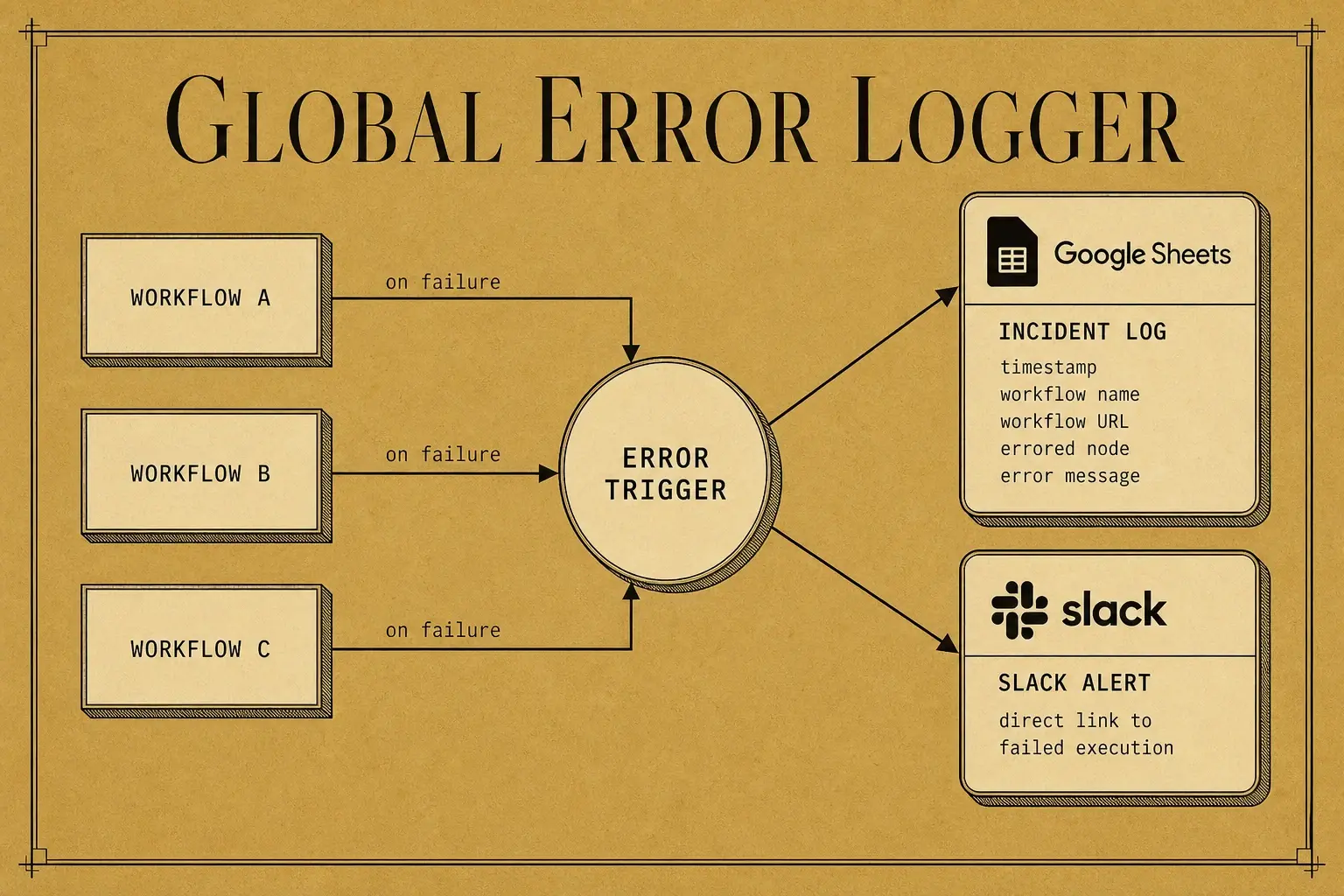
Error handling is the line between a demo and a system, and the centerpiece is a global error logger. Not optional for anything in production.
The pattern: build a separate workflow that begins with an Error Trigger node, and point each main workflow's "Error Workflow" setting at it. When a main workflow fails, the handler receives an object carrying everything you need to log the incident and alert yourself:
- the execution ID,
- the workflow name,
- the workflow URL,
- the specific node that failed,
- the error message.
Write those fields to a Google Sheet (one column each: timestamp ({{ $now }}), workflow name, workflow URL, errored node, error message) then fire a Slack node carrying a direct link straight to the failed execution. The result is one centralized incident log across every workflow you run, so you stop spelunking through individual execution histories to find what broke. When a task fails, start at the final result in that log and walk backward. The weak link is almost always one or two steps before the end.
Three more failure-specific guards are worth building in by default.
- Human-in-the-loop for high-stakes actions. Before an agent sends a client-facing email, posts publicly, or (in the homelab build) runs an SSH command that can modify a system, route the output through a "Send and Wait for Response" node on Telegram or Slack. The workflow pauses for approval. Deny it and you loop the feedback back to a revision step. Where the action is destructive, enforce it by requiring boolean flags in the agent's structured output, parsed to drive a conditional branch. "Draft" runs free, "send" requires approval. That keeps model errors from ever reaching the outside world while still automating the bulk of the work. Push that pattern all the way and it stops being a node and becomes the product: Imprimatur is a creative-approval pipeline built on exactly this shape, where an AI pre-check reads the real file bytes before a client ever sees the work, the client approves or rejects through a no-account link, and an append-only event spine the database itself refuses to let you edit keeps the record of who approved what.
- Polling loops for async APIs. Long-running jobs (video generation, large scrapes (Firecrawl is the recurring example)) don't return instantly. Fire the initial request, then build a poll that waits, checks status, and loops back until the job reports complete. The exact shape: Wait → GET status → if not "completed," false-branch back to the Wait node → loop. Skip the loop and the workflow errors out grabbing a result that isn't ready. Set the wait too short and you fail before the job finishes, so the interval is a tuned parameter, not a guess.
- Branch coverage. Every If / Switch must send both the true and false paths somewhere, even to a No-Operation node. An unhandled branch is an invisible failure: the workflow reports success while silently dropping half its inputs. An If node that routes every item to the false branch because of a field-name mismatch looks identical to success in the execution count, which is exactly why you check item counts on both sides of every branch.
CH.08
n8n versus Make: which should you use, and where's the hype?
The honest comparison is a threshold, not a verdict: a lighter platform fits simple linear flows with few failure vectors, and heavier rigor is warranted the moment you add model nodes, branching, or external APIs that fail unpredictably. The two diverge in a handful of places that matter.
| Dimension | Edge | Why |
|---|---|---|
| Module availability | n8n | A larger native integration library (the field claims 15–25× more, community nodes included). (creator-reported multiple, not independently verified) |
| Code / JS integration | n8n | Native JavaScript in any field expression. Make needs a paid third-party (CustomJS) for the equivalent. |
| Flow control | n8n | More expressive conditional logic and loopbacks. Make's Router/Filter modules work but are coarser. |
| Cost at volume | n8n (self-hosted) | The software is free. You pay only for a VPS (the field cites roughly $5–$50/mo). Make charges per operation, which scales poorly. |
| Setup speed for non-technical users | Make | Webhook setup is click-and-go with an auto-populated URL. n8n's is clunkier, with manual GET/POST method switching. |
| Email-triggered automations | Make | Mail Hooks mint a dedicated address that triggers an automation on receipt. n8n has no built-in equivalent. |
A couple of integration details are worth carrying:
- Connecting Google services through n8n's OAuth2 flow handles token refresh automatically, and an expired key that never refreshed is the single most common cause of a workflow that "stopped working" overnight.
- Make can require more manual redirect-URI configuration and has been observed to hang without an error message when the wrong HTTP method is set, a far nastier failure than a loud one.
- Exporting and sharing a workflow as JSON is also faster in n8n than Make's file-upload path.
The engineering truth underneath stands regardless of the numbers: self-hosting removes per-operation pricing entirely, which is what makes a high-volume workflow economical, and it's the one automation layer you actually own. For serious work involving model nodes, real data transformation, and branching logic, native JavaScript alone removes a whole category of external formatting tools. The lighter platform earns the pick when you need the fastest possible setup for a simple trigger and you're confident your volume stays under the per-op pricing cliff.
CH.09
Where is the field right, and where is it overselling?
The field's own narrative wraps real substance in real hype, and the cleanest way to separate them is this: the useful claims are boundaries, and the loudest overclaim is a timeline. The boundary is the one this whole note keeps returning to: add intelligence only where the path is genuinely ambiguous, and nowhere else. That part the field gets right.
The overclaim is the timeline. The loudest prediction in the field is that technical execution skills are being invalidated fast:
- within roughly 12 months, natural language will author more than half of all workflows,
- within roughly 24 months, a model will build complete systems end to end.
Treat these as creator-reported predictions, not facts. The rebuttal sits inside the very tutorials making the claim: someone still has to understand the shape of the business, validate the outputs, and handle the edge cases, which is exactly why frameworks like CLEAR and methods like Reactive Prompting exist at all. The defensible read: the mechanical skill of wiring nodes is commoditizing. The judgment (what to build, where a model helps, how to verify it worked) is not. That's where the durable value sits.
CH.10
What's the build plan: do this, then that?
One sequenced procedure, where every step carries a check you can actually perform. The bias throughout is toward shipping a working artifact early and adding complexity only after the base case runs stably.
| Step | Do this | Verify |
|---|---|---|
| 1 | Wireframe first. On paper or in Excalidraw, map the trigger, input shapes, conditional branches, model decision points, API calls, and outputs. Break a large job into several small workflows, not one sprawling canvas. | You can describe each branch's true/false destination before you open the editor. (The field's line: this "prevents hours of debugging and deleting nodes later.") |
| 2 | Set up the environment and OAuth2. For production, self-host on a VPS (Hostinger, DigitalOcean) rather than leaning on the cloud trial and its tight execution cap (check n8n's current pricing for the exact figure). Use OAuth2 wherever offered so tokens refresh automatically. For Google that means a Cloud project, the specific API enabled, the consent screen configured (Test or published), and the redirect URL pasted from n8n into the client. | A credential test call returns a 200, not a hung request. |
| 3 | Build the trigger and first action, then pin. Run the trigger once against real data, then click the pin (thumbtack) on its output to cache it. Now iterate downstream without re-firing the source or re-billing API calls. Pin a form node's output to tune a prompt and email formatting without re-filling the form each time. | The pinned item shows the right shape in JSON view. |
| 4 | Use expressions everywhere. {{ $now }} so a prompt knows the date, .removeTags().trim() on scraped input, bracket notation for any header with spaces, correct Edit Fields data types so numbers stay numbers. |
Reorder a node and confirm every reference still resolves. The silent-break test. |
| 5 | Add branching with explicit handling. Every If/Switch routes both paths somewhere, even a No-Op. | Feed an input that takes the false branch and confirm it lands intentionally. |
| 6 | Build the error handler before adding complexity. Error-Trigger workflow, log to Sheets, alert to Slack with an execution link, referenced in every production workflow's settings. | Deliberately break a node. Confirm a row appears in the sheet and a Slack ping arrives with a working link. |
| 7 | Add model nodes last, with structured output. Force JSON, attach a Structured Output Parser with a schema, validate before mapping downstream. | A malformed model response is caught by the parser, not by the destination node failing. |
| 8 | Kill the attribution footer. In the Gmail node's options, turn off "Append attribution," or every automated email ships with a "sent by n8n" footer that breaks the professional illusion. | Send one to yourself and read the footer. |
| 9 | Switch to the Production URL and stress-test with volume. The Test URL only works while the editor is listening. Copy the Production URL, toggle the workflow Active, and hit it from an incognito browser to simulate a real user, then run it repeatedly (one homelab operator reports 50–200 iterations depending on how critical the workflow is). | One clean run proves nothing. A clean run across the whole batch is the bar. |
| 10 | Verify with a second, differently-formatted dataset. Unpin the test data and run a file with markedly different formatting (different invoice layouts, email structures, field orders). | If the model or the mapping only works on your original sample, it'll break in production. This is the step most people skip and the one that catches the most. |
| 11 | Monitor and iterate reactively. Watch the error log. When an agent fails, add one specific rule. When a transformation breaks on a new edge case, add one method. The system is never "done." It is maintained. | Set a fixed review cadence: daily for a new workflow's first two weeks, weekly once stable. |
CH.11
How do you know it actually worked?
The error logger's sheet is the primary dashboard, and the bar is plain: it should show zero entries through the first 48 hours of production. If rows appear, the Slack alert's direct link gets you to the failed execution immediately, no archaeology. For agent workflows, periodically audit the Window Buffer Memory setting, which defaults to only a handful of recent messages.
If real conversations run longer than that buffer, raise it or move to session-ID-based memory, so you never leak one user's context into another's reply.
For cost, compare expected model usage against actual billing. Disciplined pinning during development keeps dev charges near zero, and this is where an expensive trap lives.
Pinned data is a development-only crutch: the platform does not use it once a workflow is live, so forgetting to unpin before activation means stale test data gets processed as if it were real, quietly, and at scale.
If production cost spikes, trace the offending node. Almost always an unpinned model node firing inside a loop, or a trigger firing far more often than you assumed. Read the trend, not the absolute:
- Cost up and output up proportionally means it's working.
- Cost up and output flat means a loop somewhere.
One threshold is worth holding to.
When more than a fraction of executions in a review period need manual intervention to recover, the workflow is not production-stable, regardless of how elegant its design looks.
The right response isn't to patch symptoms one at a time. It's to re-evaluate the tool or approach for the node that keeps failing. There's a real line between normal maintenance and a workflow that costs more than it saves, and crossing it is a signal to change the approach, not patch harder.
The final test of a durable workflow isn't that it runs. It's that it can be handed to someone else. What lets a teammate touch it without you in the room:
- descriptive node names,
- sticky-note documentation on the canvas,
- reusable templates.
A workflow only its builder can operate isn't a system. It's a liability with a nice UI.
The discipline behind reliable no-code automation turns out to be the discipline behind reliable code: understand your data structures, handle failure explicitly, and test against the ugly inputs that will actually arrive. The visual canvas makes it tempting to skip all three. The platforms make it easy to build something that works once. The work (the entire job) is making it work every time.
The 4 skills behind this note
- Sign in to open
Research a topic into clusters
Turn a TOPIC into current, deduped, exhaustively-sourced DRAFT NOTES via the v5 research engine (research/,...
- Sign in to open
Publish the article
THE long-form article publisher
- Sign in to open
Narrate a note (audiobook)
Stage 3 of the blog pipeline
- Sign in to open
Generate the quiz
Stage 4 of the blog pipeline